
Capture, annotate, and document your work in seconds.
Capture screenshots or recordings from any tab, annotate in place, and automatically save everything to Google Drive and Google Sheets.
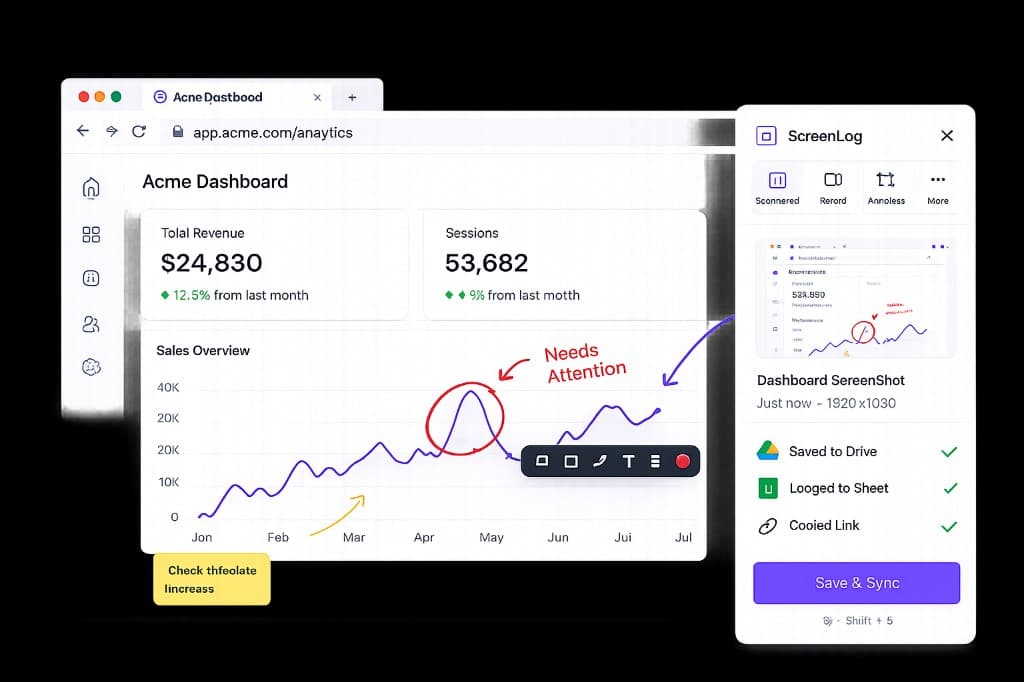
Everything you need to document, faster
Capture Anything
Take screenshots of any tab, visible area, full page, or selected element.
Record Your Screen
Record tabs, workflows, bugs, or demos with high quality and smooth performance.
Annotate In Place
Add arrows, highlights, shapes, text, blur sensitive data, and comments easily.
Auto Sync
Automatically upload everything to Google Drive and log all details in Google Sheets.
From issue to documentation in under 10 seconds
Capture
Take a screenshot or record your tab
Annotate
Highlight, mark, and add context
Upload
Saved to Google Drive automatically
Log
All details logged to Google Sheets
Captures logged per month
Customer satisfaction rate
Average Chrome Store rating
Boost your Capture Productivity
See how teams use Capo to screenshot, annotate, and log bugs in under 30 seconds — without leaving the browser tab.
Get started in 3 easy steps and start capturing
Set up Capo in under 60 seconds. No configuration headaches.
Install Chrome Extension
Add Capo from the Chrome Web Store in one click. Works on Chrome and Brave.
Connect Google Account
Link your Google account and pick the Drive folder and spreadsheet for captures.
Capture & Submit
Screenshot or record, annotate, fill your sheet fields, and hit submit.
No more tab switching
Capture and annotate without leaving the page you are on. Capo overlays directly on any tab.
- Region select on any website
- Annotate with arrows, boxes, and pins
- Submit without alt-tabbing
No more data entry
Your Google Sheet columns become form fields automatically. Selects, dates, and free text — no manual setup.
- Auto-detects column headers
- Dropdowns from existing sheet values
- Date and number fields from formatting
Save hours per week
Teams replace a 5-step manual process with one click. Across dozens of captures a day, the time adds up fast.
- Screenshot + Drive + Sheet in one flow
- Screen recording with audio support
- Works with any Google account
Why Choose Capo
Everything you need to capture, annotate, and log — without leaving your browser.
Built for QA teams
Every test pass or fail documented in your sheet with screenshots and annotations attached.
Organized captures
Files land in your Drive folder. Rows append to your spreadsheet with live links and metadata.
Easy feedback sharing
Comment pins and annotations make it clear what broke, where, and how to reproduce it.
Never miss a bug
Capture context while it is fresh. No more forgetting to log after you have moved on.
Simple, honest pricing
Start free. Upgrade when Capo becomes a daily habit.
10 screenshots & 3 recordings per month.
Get started- ✓ Google Drive + Sheets
- ✓ Basic annotation
- ✓ 2 header templates
Unlimited captures for daily workflows.
Get started- ✓ Unlimited screenshots & recordings
- ✓ All templates
- ✓ No watermark
- ✓ Priority support
Pay once, own it forever.
Get started- ✓ Everything in Pro
- ✓ All future updates
- ✓ No subscription
Explore Our FAQs
Everything else, just ask us.
Fits right into your workflow
Install Capo, connect Google, and your next capture lands in Drive and Sheets automatically. No setup friction.